

Spot traders often know where they would like to take profit and where they should exit, but they wait until volatility starts before entering those orders. That is where order tools such as OCO, stop-limit and trailing stop can help. They do not remove risk, but they force the trader to define the plan before the market becomes emotional.
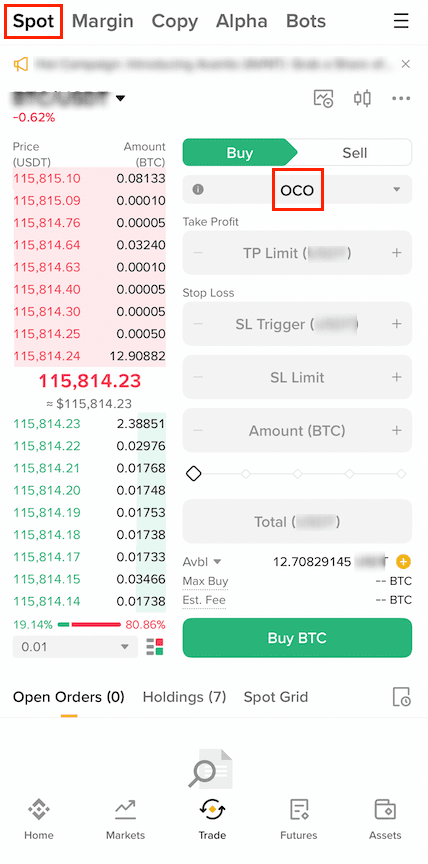
Binance explains that an OCO order combines a limit order and a stop-limit order. If one side is triggered or canceled, the other side is canceled as well. For a sell plan, the limit order can sit above the current market as a take-profit level, while the stop-limit leg sits below the market as a downside exit plan.
The detail many beginners miss is that a stop-limit order has two prices. The stop price activates the order. The limit price is the price submitted to the order book. Binance?s stop-limit guide notes that activation does not guarantee an immediate fill, because the resulting limit order still depends on market price and liquidity.
A trailing stop solves a different problem. Binance describes it as an order whose trigger follows the position when price moves favorably and stops moving when price reverses. That can protect part of a gain, but choosing a trailing delta that is too tight can cause a normal pullback to trigger the exit. Choosing one that is too wide can leave too much risk on the table.
For a disciplined workflow, write down the trade idea first, then choose the order type. Use OCO when both a target and a protective exit should be active. Use stop-limit when execution price matters more than certainty of exit. Use trailing stop only when the position already has enough room to breathe.
Sources: Binance OCO order guide; Binance stop-limit guide; Binance spot trailing stop guide.
Risk notice: Order tools cannot guarantee execution during gaps, thin liquidity or fast markets. This article is educational and is not official customer support or investment advice.
原创文章,作者:financial transaction,如若转载,请注明出处:https://www.fanbi.net/archives/3178

:max_bytes(150000):strip_icc():format(webp)/cme-fedwatch-tool-7559817-final-11e4b616b4bb4f43a15b6d8cef830509.png)