Broker apps now make it easy to build watchlists, set price alerts and place stop or stop-limit orders. Fidelity notes that alerts can monitor price levels, percentage changes, moving averages and 52-week highs or lows. Those tools are useful, especially around earnings, but an alert is only a notification.
The first decision is whether the trader needs information or execution. A watchlist organizes symbols. A price alert tells the trader something happened. A stop order attempts to trigger an exit or entry. Confusing these tools is dangerous: seeing a push notification during a fast earnings move is not the same as having a resting risk-control order.
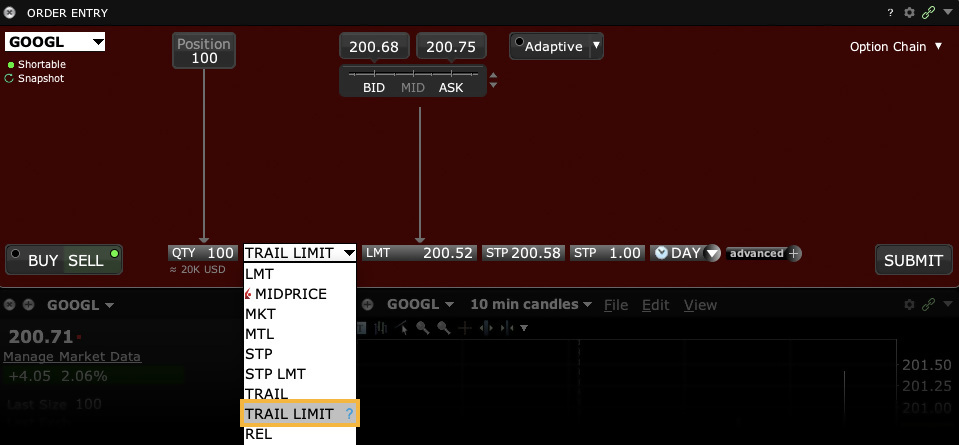
Stop orders also have trade-offs. Fidelity and Interactive Brokers both explain that stop orders may help manage losses or protect gains, but a stop can become a market order and fill away from the trigger price. A stop-limit adds price control, but it may not fill. Around earnings gaps, neither tool should be treated as perfect protection.
A practical app workflow is to create a watchlist for the event, set alerts for decision points, and predefine the maximum loss before the release. If the position must be closed automatically, use an order type that matches the liquidity and gap risk. If the plan requires human judgment, reduce position size so a delayed response does not damage the account.
Sources: Fidelity Viewpoints on alerts; Fidelity Viewpoints on trading orders; Fidelity Trade Armor help; Interactive Brokers stop and stop-limit order lessons.
Risk notice: Alerts, watchlists and order types cannot guarantee execution price or prevent losses. This article is educational and not investment advice.
原创文章,作者:financial transaction,如若转载,请注明出处:https://www.fanbi.net/archives/2705